MCP authorization
First configure your auth server.
It authenticates the user with World ID over OIDC, maps (iss, sub) to your
application's account, and issues OAuth access tokens for your MCP server.
The MCP client connects the agent to your server and presents those tokens when
calling its tools.
Browser authorization
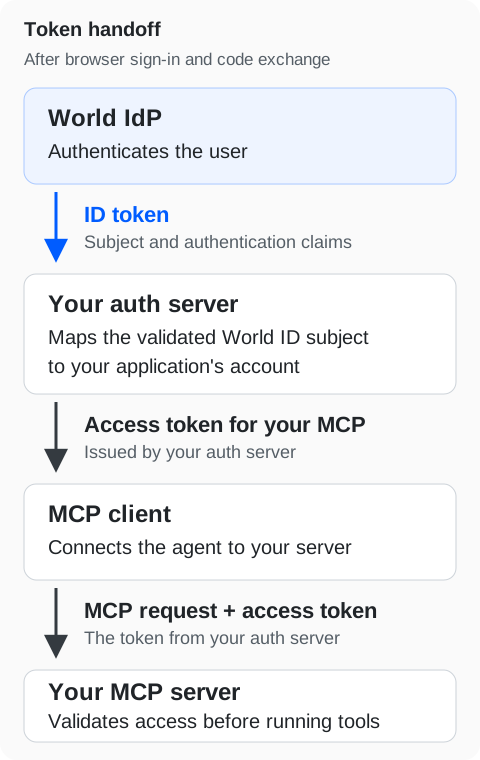
Browser authorization uses two code exchanges:
- World IdP → your auth server: World IdP redirects the user's browser to your auth server's callback with a code. Your auth server exchanges it for an ID token and validates the result.
- Your auth server → the MCP client: after checking permissions and required consent, your auth server redirects the browser to the MCP client's callback with a different code. The client exchanges it for an access token for your MCP server.
Keep the two code exchanges' state, PKCE verifiers, callbacks, and codes separate. Bind both exchanges to the same pending login. Use existing OAuth/MCP components for client registration, redirect validation, S256 PKCE, resource binding, and consent.
Protect your MCP server
Publish protected-resource metadata identifying your own auth server, and challenge requests without a valid access token. The MCP client uses that metadata to start authorization in the user's browser. Validate each access token's issuer, audience, expiry, permissions, and revocation policy. Require access tokens issued for your MCP server's resource, and test rejection of tokens intended for other resources.
https://auth.world.org/mcp issues tokens exclusively for the World ID user and developer MCP
resources and rejects any other resource.
Device authentication
If your authorization server supports World ID device authentication, use the Device Authorization Grant for that upstream step. Your authorization server validates the returned ID token and issues its own access token for your MCP resource through a downstream authorization flow that the MCP client supports. Confirm support for that downstream flow in both your authorization server and MCP client.
For authentication freshness at tool execution, follow Step-up authentication. For ID-JAG-based access, see Cross-App Access (XAA).
Reference: MCP authorization (opens in a new tab).